
Handling Rebase when Branching off a Feature Branch
Sometimes, branching a new feature off of an existing one is necessary, but it often makes rebasing feel like a nightmare. In this post, I share my personal approach to keeping a clean project history when dealing with these “grandchild” branches.
Introduction
Our team tries to maintains a clean, linear project history by rebasing our branches before merging. Handling complex rebasing can be stressful, especially when you branch off of a feature branch instead of main. I used to find this nested workflow confusing, but I learned an approach to handling this specific situation to make complex rebasing less intimidating.
How Git Rebasing Works
Rebasing moves the starting point of your feature branch to very tip of the updated main branch. Git sets your unique commits aside, updates your branch’s base, and reapplies your commits one by one. This creates a clean, straight line in your project’s history.
Why Problems Arise in This Scenario
Consider the following scenario: you create a server branch directly from main, make commits, and then you branch a client branch directly from that server branch and make a few more commits there. After that, both main and server make additional commits. This creates a dependency where your client changes rely on the code in the server branch, which isn’t in main yet.

When the server branch is eventually rebased onto main, the underlying history your client branch relies on changes. This can lead to unexpected duplicate commits and merge conflicts if you don’t handle it properly, because git might try to replay commits that already exist in your client history, but with different identifiers after a rebase. As seen in the tree below, both client and server contain c2 and c3, but they each have unique identifiers.

The workflow
To tackle this issue, I decided to use a specific workflow for this nested case: always merge the base branch (in this case, server) into main before we merge the dependent branch (the client) into main. This simplifies things significantly and helps maintain clarity. First, we focus on getting the server branch updated and merged. Since server comes directly from main, handling its rebasing is straightforward. We make commits on server, and when it’s ready, main has likely moved forward. We just switch to our local server branch and run a standard git rebase main to incorporate all the latest main changes.
Handling the Dependent Branch
Now, let’s see how to synchronize the dependent client branch. Remember that as work continues on both the main and server branches, you need to decide when and how to sync your client branch to include those changes. We face two main situations here before server is merged into main.
First, if the server branch has been rebased onto main, its commit history has been rewritten, and those original commits the client branch depends on now exist as different commits with different identifiers. If you were to do a standard rebase of client onto server at this point, git might get confused and try to re-apply the original server commits that are still part of your client history, even though a different version of them is now on the server branch.
To avoid duplicate commit conflicts, you would use a more specific command: git rebase --onto server <last-server-commit-hash>. You’ll need to find the commit hash of the last commit on the old server history that client originally branched off from (let’s assume it’s old-hash). This command tells git to take all the commits on the client branch after old-hash, and reapply them directly on top of the current rewritten server branch, skipping the old history. This avoids replaying those potentially conflicting original server commits.
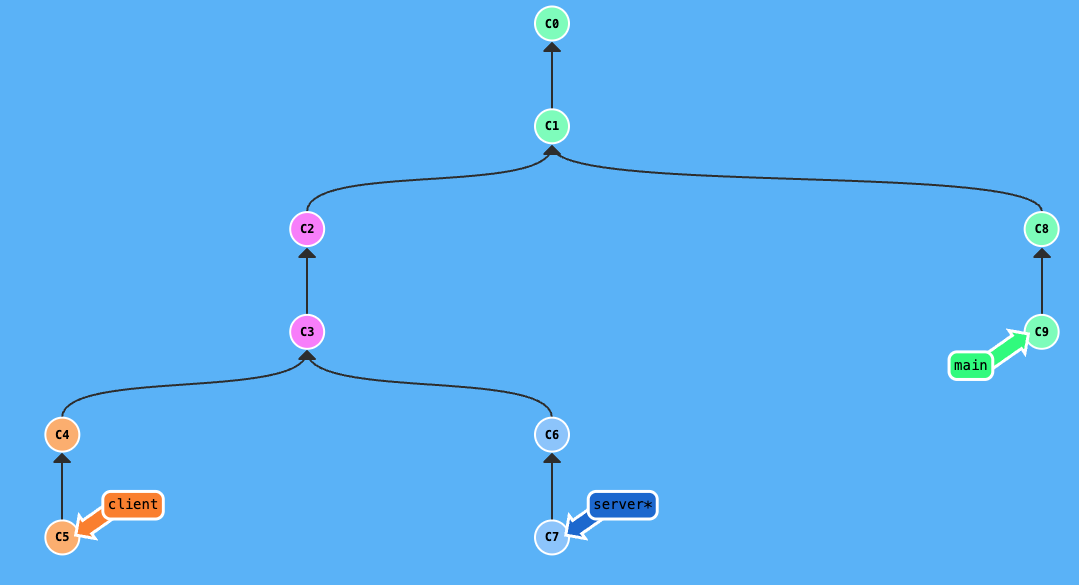
After git rebase main on server:
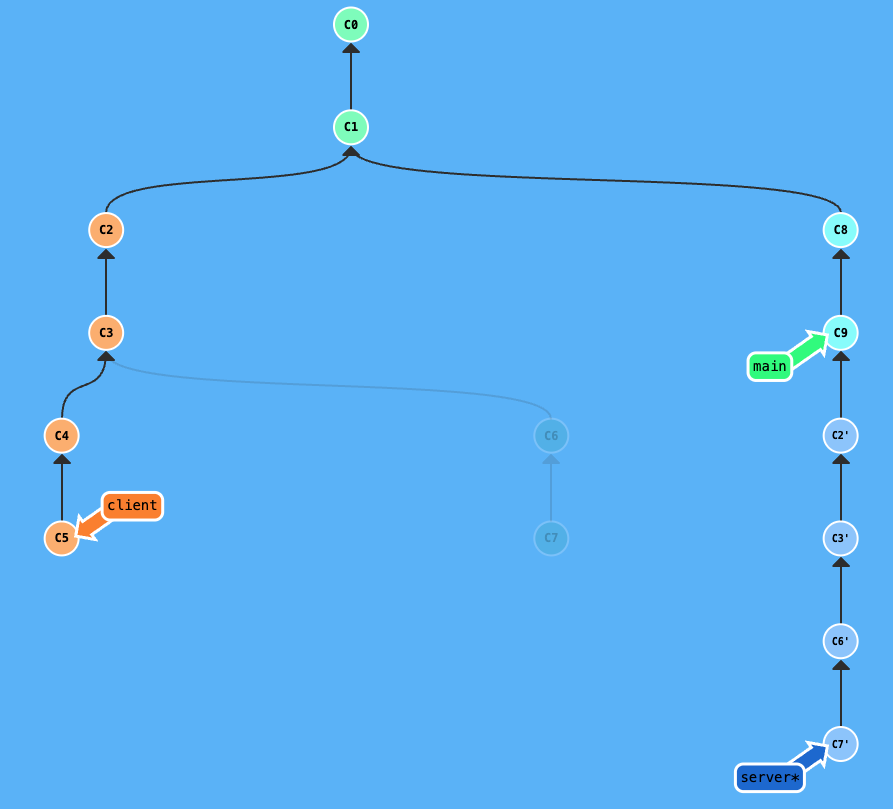
After git rebase --onto server c3 on client:

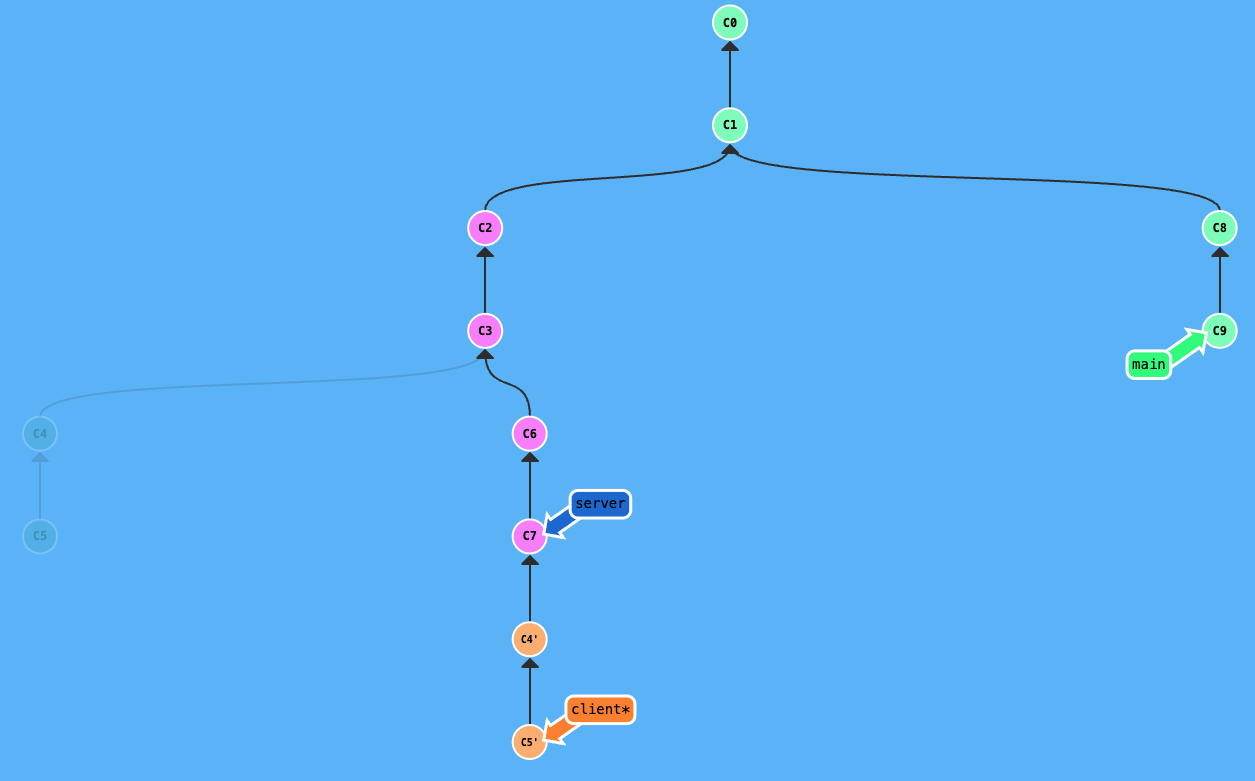
Second, if the server branch just has new commits added to its tip and its history hasn’t been rewritten by a rebase onto main yet, synchronizing is easy. On your client branch, you just need to run git rebase server. Git will recognize the common ancestor (where your client originally branched from), fast-forward the base point to the current tip of the server branch (including those new commits), and then replay your unique client commits on top. The client branch is now in sync with server.
After git rebase server on client:
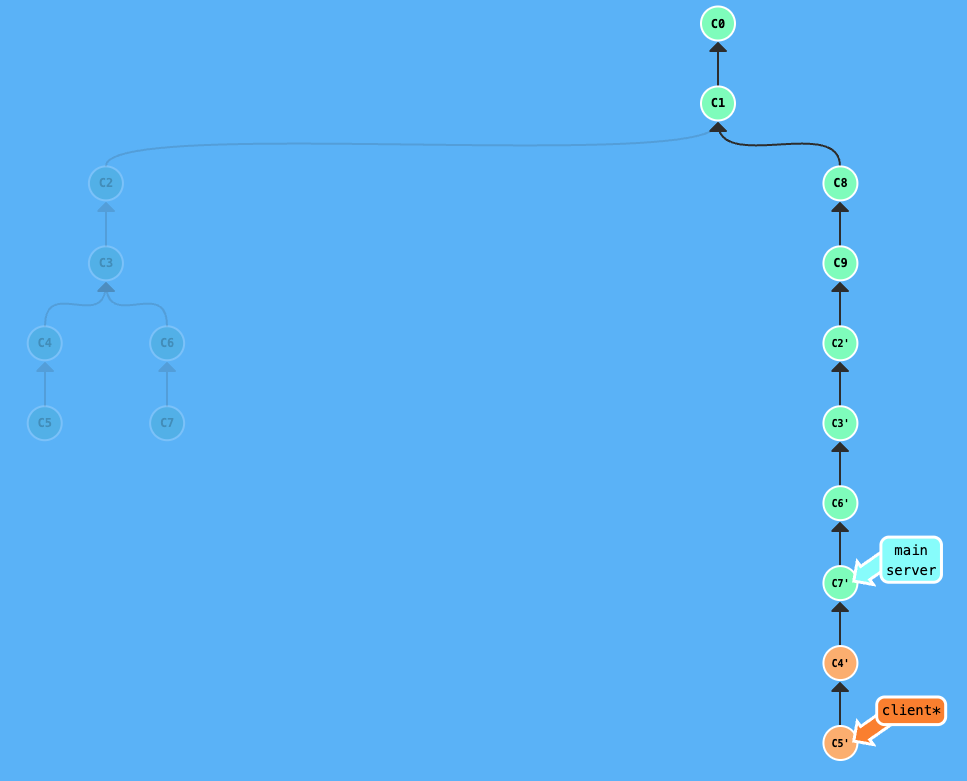
Once the server branch has been merged into main, you should use the --onto command to rebase client onto main. Because the workflow involves rebasing server onto main before merging, the commit history of server was rewritten. This means your client branch is likely sitting on “ghost” commits, that is, the old versions of the server work that no longer match the new commit hashes on main. If you do a regular rebase, Git will look at the history and fail to recognize the old server commits on the new main branch, and try to re-apply them. This leads to duplicate commits and merge conflicts.
To navigate this and get the client branch ready for its own merge, you must use the --onto command. First, find the hash of the last old server commit that your client branch originally started from. On client, run the command: git rebase --onto main <last-old-server-commit-hash>. This explicitly tells Git to ignore the old, redundant server history and only transplant the unique client commits onto the newly updated main branch. This cleanly skips over the duplicated work and saves you from resolving unnecessary conflicts.
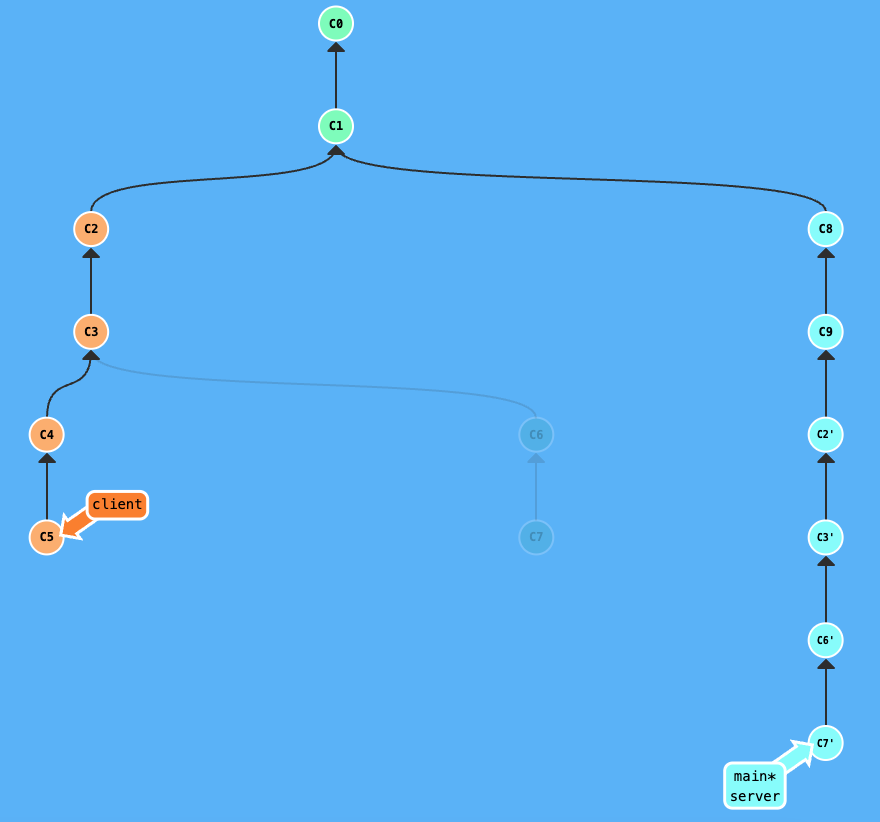
After git rebase --onto main c3:
Remember that whenever you rebase a branch that has already been pushed to a remote server, you’ll need to use git push --force-with-lease instead of a regular push. This force push is necessary because you’ve rewritten the branch history, and --force-with-lease adds a safety check to make sure you aren’t overwriting anyone else’s new work on that branch.
Conclusion
Dealing with Git rebasing when you have dependent branches requires a clear workflow. Always remember to merge the independent branch (server in this example) first, as this simplifies the process for the dependent branch (client). Standard git rebase works great when the parent branch hasn’t rewritten its history, but for situations where the parent history has been changed (like after a rebase onto main), git rebase --onto is here to help. While it might seem like extra effort compared to merging, maintaining a linear project history makes everything easier to understand, review, and troubleshoot. I hope sharing my experiences make tackling complex rebasing easier for you!